Animation & ControlModifiers
Expression
Evaluates a small maths expression each frame, with three constants and the input available.
The Expression node runs a formula. t is time, x the input, and a, b, c the three sliders.

- Expression text, a, b, c
- Found in the node graph under Modifiers → Logic & Timeline
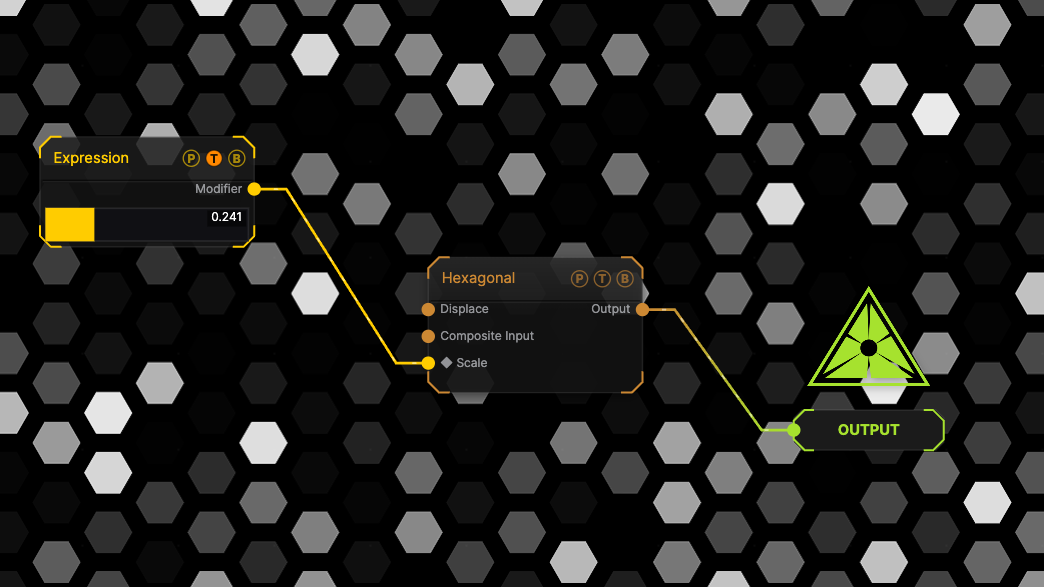
The image on the right is the example patch itself. Drag and drop it onto the app, or load it with File → Load, to open the full graph. The modifier drives the Scale of a Hexagonal generator; the meter on the node shows its live value.
Inputs and outputs

| Port | Type | Purpose |
|---|---|---|
| Input | Modifier | The value to process, 0–1 unless the source says otherwise. |
| Modifier | Modifier | Drag it onto a parameter row, or wire it into another modifier's input. |
Parameters
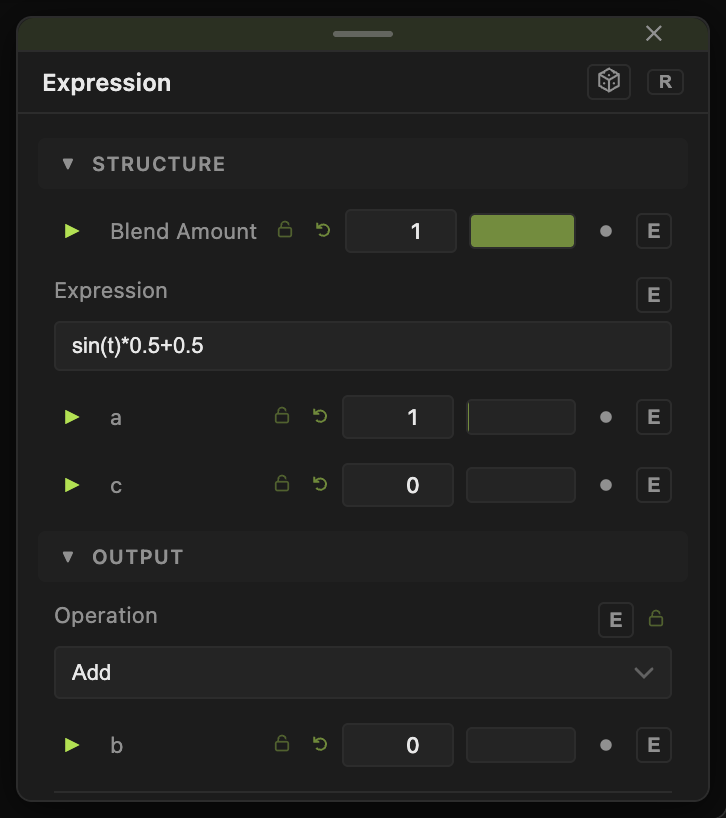
- Expression (default
sin(t)*0.5+0.5). - a (default 1), b (default 0), c (default 0), each −100 to 100.
Every slider has a per-parameter animation bar and can itself be driven by another modifier.
Examples
Bouncing — abs(sin(t*a)) with a 3.
Troubleshooting
Output is 0 — the expression has a syntax error. Check the node for a red mark.