Input & Output
NDI In
Receives an NDI stream from the network as a texture.
The NDI In node subscribes to an NDI source on the network. Desktop only.
- NDI Source by name or Source URL
- Fit Mode and Wrap Mode
- Found in the node graph under I/O → I/O
Inputs and outputs
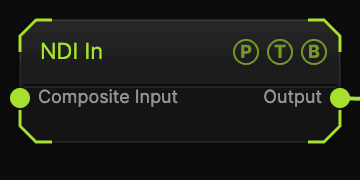
| Port | Type | Purpose |
|---|---|---|
| Composite Input | Texture | Composited under the source with Composite Mode and Composite Mix, which appear once wired. |
| Output | Texture | The received frame. |
Parameters
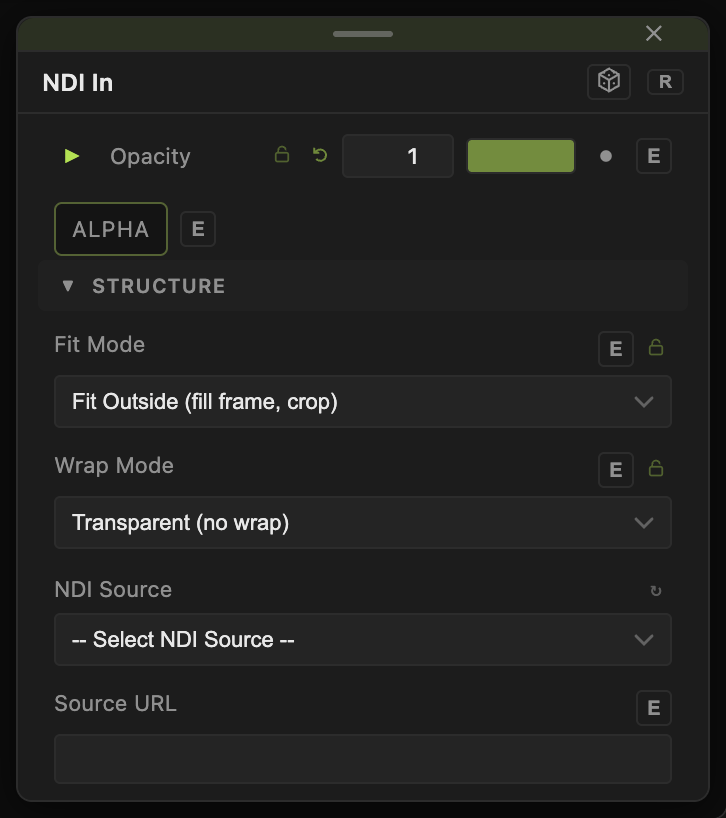
Opacity, Blend Mode, and Alpha are the standard operator header.
- NDI Source — the sender name, from the dropdown of discovered sources.
- Source URL — a direct address when discovery does not find the sender.
- Fit Mode — Fit Outside (fill frame, crop) (default), Fill (stretch), Fit Horizontal, Fit Vertical, Fit Best (letterbox), Native (1:1 pixels).
- Wrap Mode — Transparent (no wrap) (default), Repeat (tile), Mirror (tile), Hold (Extend Edge): what fills the area added by the fit.
Every slider has a per-parameter animation bar, so it can be animated, audio driven, or MIDI mapped.
Examples
Round trip — NDI In from another machine, a post effect, then NDI out on the Output node.
Troubleshooting
No sources listed — the sender is on another subnet. Enter its Source URL.